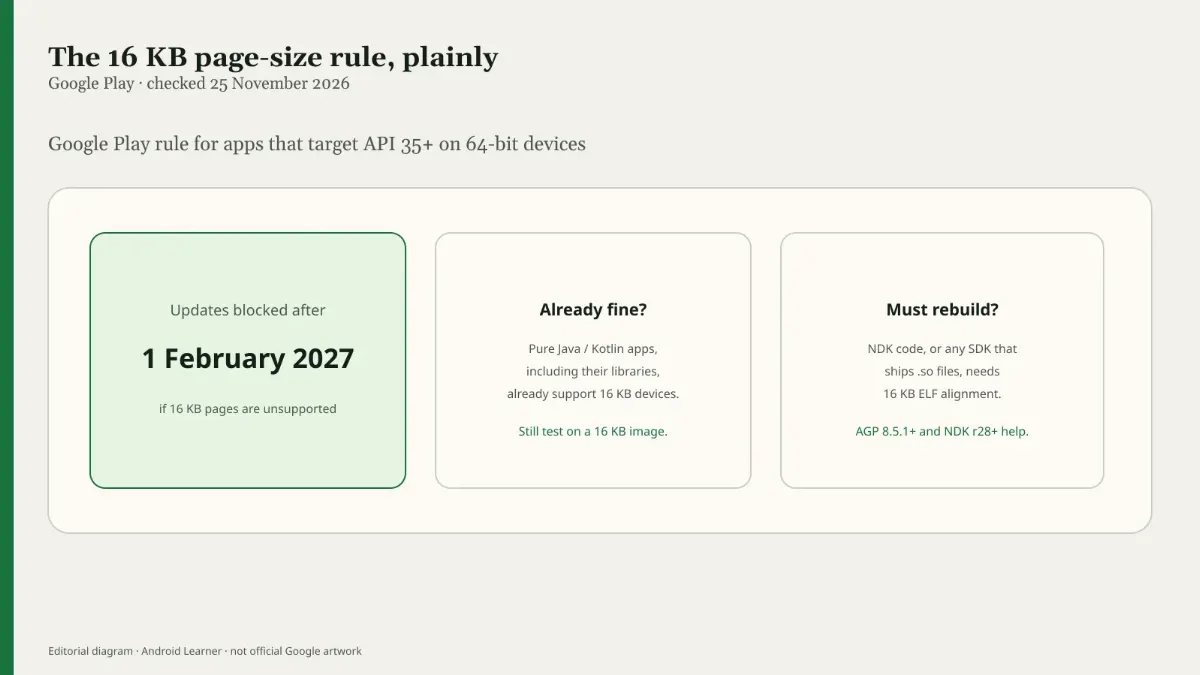
Beginning with Android 15, AOSP can run on devices that use 16 KB memory pages instead of the 4 KB pages Android historically assumed. If your app ships native code — your own NDK libraries, or a third-party SDK that includes .so files — that code must be rebuilt with 16 KB ELF alignment or it will not work correctly on those devices.
This is also a Google Play rule. The official Support 16 KB page sizes guide, checked on 25 November 2026, says that all apps targeting Android 15 (API level 35) and higher must support 16 KB memory page sizes on 64-bit devices on Google Play. Starting 1 February 2027, if your app updates don’t support 16 KB memory page sizes, you will not be able to release those updates.
Advertisement
That date has moved before, which is why you should re-read the official page and the warning in Play Console rather than a year-old blog. As of this writing, the developer documentation gives 1 February 2027, and it talks about blocking updates. It does not say that existing listings are taken down, or that copies already installed on user devices are removed.
Does this apply to your app?
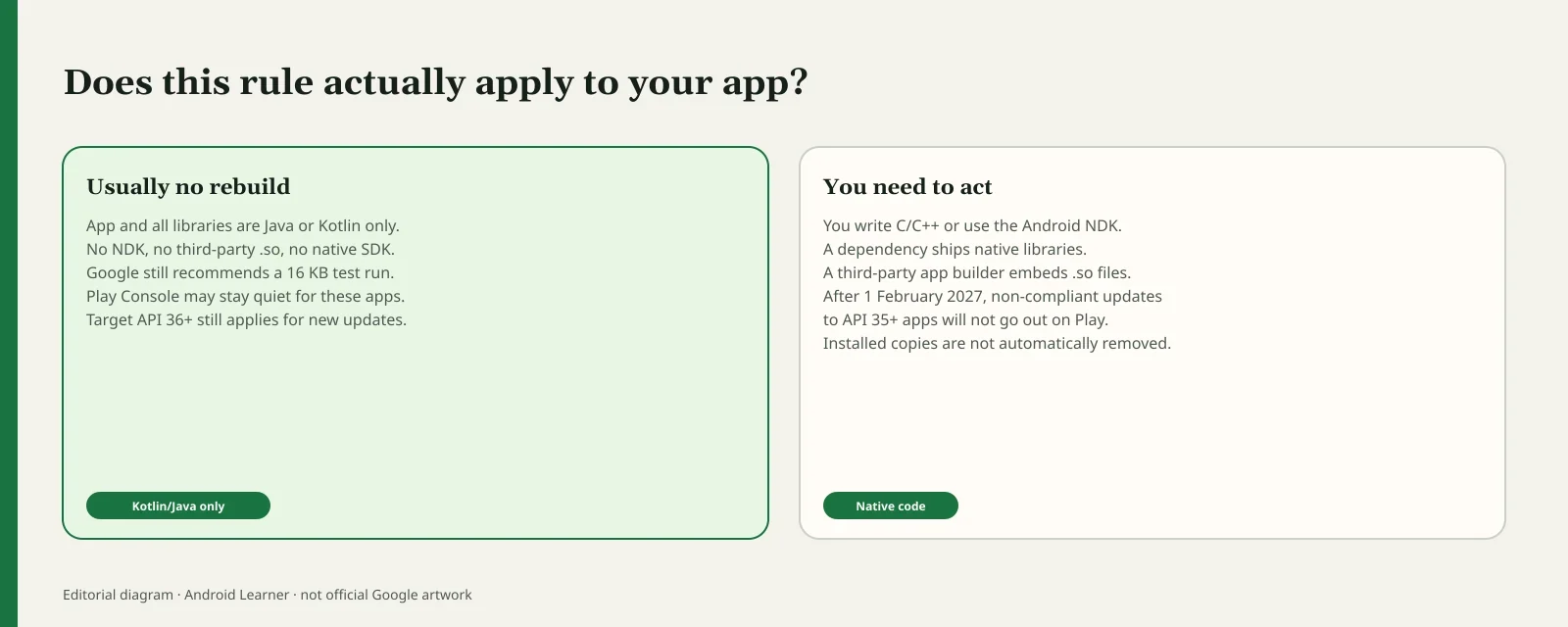
If the app and all of its libraries and SDKs are written only in Java or Kotlin, Google says the app already supports 16 KB devices. You should still run it on a 16 KB emulator image to catch surprises, but you should not need a native rebuild.
You do need to rebuild if any of these is true, quoting the conditions on the official page:
- You use C/C++ or the Android NDK.
- You link to a third-party native library or an SDK that ships one.
- A third-party app builder embeds native libraries in the package.
The practical test is simple: open the APK or AAB in APK Analyzer and look under lib/. If you see .so files, you are in the native-code path. Android Studio can also flag alignment problems automatically.
This is a packaging and compatibility issue, not a runtime memory budget. For the separate Android 17 limiter and optional app memory budgets, see Android 17 memory limits, app budgets, and the NPU feature flag. For startup work that still pays off after you are compliant, see Android performance baseline profiles. Signing the artifact you upload is unchanged; our older signing APKs from Gradle notes still apply to the release pipeline.
Why 16 KB pages exist
Devices keep shipping with more RAM. Larger pages can reduce pressure on the page table and improve some system paths. Google’s current guide lists results from its initial testing — useful as official figures, not as a promise for your app:
- Lower app launch times while the system is under memory pressure: 3.16% lower on average, with more significant improvements (up to 30%) for some apps they tested.
- Reduced power draw during app launch: 4.56% reduction on average.
- Faster camera launch: 4.48% faster hot starts and 6.60% faster cold starts on average.
- Improved system boot time: 8% (about 950 milliseconds) on average.
The same page is careful: devices with 16 KB pages use slightly more memory on average, and results on actual hardware vary. Treat those numbers as Google’s test results, then measure your own launch path.
The default fix: current AGP and NDK
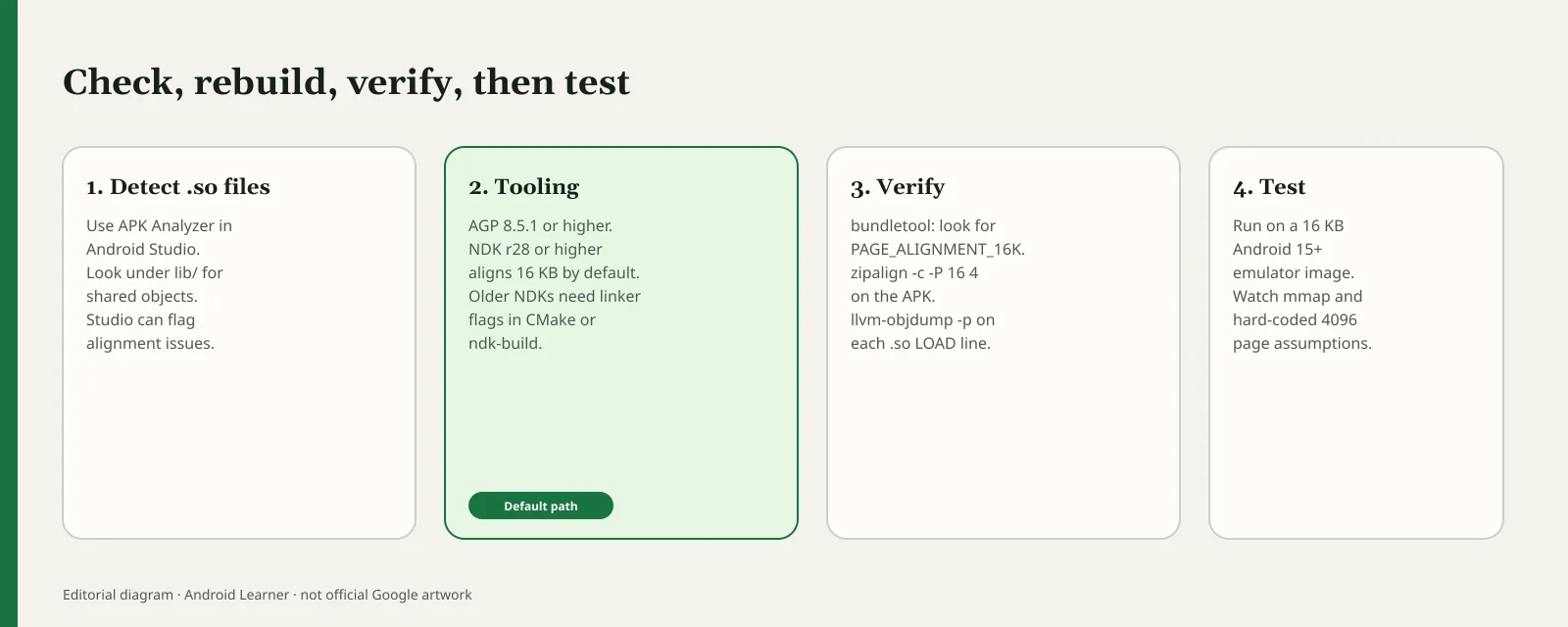
The shortest official advice is also the best one. If you update to Android Gradle Plugin 8.5.1 or higher and NDK r28 or higher, and your prebuilt dependencies are already 16 KB compatible, your app is 16 KB compatible by default. You can then skip straight to fixing code that assumes a 4 KB page and to testing.
AGP 8.5.1 or higher is also what you need so uncompressed shared libraries are aligned on a 16 KB zip boundary, which 16 KB devices require.
If you are still on an older NDK, you must pass linker flags yourself.
# Android.mk (ndk-build, older NDK)
LOCAL_LDFLAGS += -Wl,-z,max-page-size=16384 -Wl,-z,common-page-size=16384# CMakeLists.txt (older NDK)
target_link_options(${CMAKE_PROJECT_NAME} PRIVATE
"-Wl,-z,max-page-size=16384"
"-Wl,-z,common-page-size=16384"
)Both snippets are from the official page. Even if you dynamically link libc++_shared.so from NDK r26 or lower — some of those C++ runtimes were not 16 KB aligned — you should still update the alignment of every library you ship, and prefer a newer NDK so the shared C++ runtime is aligned too.
Older AGP versions have a different packaging story. For some 8.x lines Google documents packagingOptions.jniLibs.useLegacyPackaging, and for AGP 8.0 or lower, android.bundle.enableUncompressedNativeLibs=false in gradle.properties. Read the section that matches your AGP version; copying a flag from a different major version is a common way to think you are compliant when the zip alignment is still 4 KB.
If the app does not extract native libraries to the filesystem (extractNativeLibs set to false), compiling with 16 KB ELF alignment can increase the binary size slightly. Android 15’s package manager optimizations, the guide says, negate the runtime cost of that increase.
How to verify the artifact, not just the build
Do not stop at a green compile. Google documents three checks.
1. Bundle alignment. Ask bundletool whether the AAB requested 16 KB zip alignment:
bundletool dump config --bundle=app-release.aab | grep alignmentYou want PAGE_ALIGNMENT_16K. PAGE_ALIGNMENT_4K means the APK produced from that bundle will still have 4 KB-aligned .so files in the zip.
2. APK zip alignment. After you compile, run zipalign from build-tools (the guide’s example uses 35.0.0; use the build-tools revision you actually have):
zipalign -v -c -P 16 4 app-release.apkThe last line of the output tells you whether the check passed.
3. ELF LOAD alignment on each .so. From the NDK llvm toolchain:
llvm-objdump -p libapp.so | grep LOADOn Linux or macOS the same idea with llvm-readelf is:
llvm-readelf -Wl libapp.so | grep 'LOAD\|RELRO\|Type'Each LOAD segment should be aligned for 16 KB — look for align 2**14 (16384), not 2**12 (4096). The official page also describes a RELRO check: GNU_RELRO should be present, and that segment needs to satisfy the same 16 KB compliance rules in the guide. Run this on every ABI you ship, including libraries that came from an SDK. A correctly aligned app with one 4 KB third-party .so is still a Play problem.
Fix code that assumes a 4 KB page
Alignment is necessary but not sufficient. Native code that hard-codes 4096 or PAGE_SIZE as the page size can still fail on a 16 KB device.
Google’s guidance:
- Do not assume the page size is 4096. Use
getpagesize()orsysconf(_SC_PAGESIZE). - Audit
mmap()and other APIs that require page-aligned arguments. - If you used
PAGE_SIZEonly as a convenient chunk size and never passed it to the kernel, the app may keep running, but passing that value tommapwithoutMAP_FIXEDstill wastes a whole page on 16 KB devices. - Check custom allocators.
Then install a 16 KB system image and run the app. The official page points you at Android 15 and later emulator images configured for 16 KB pages. Exercise startup, any screen that loads a native SDK, camera or media if you use those NDKs, and game engines if you ship one. A Play Console warning going away is not a substitute for that pass.
Also check your SDKs. If a dependency has not published a 16 KB-aligned build, upgrading AGP will not rewrite someone else’s .so. You will need a newer SDK version, a replacement, or a conversation with the vendor before 1 February 2027.
What Play will and will not do
As of the current Google documentation:
- The requirement applies to apps targeting API 35 or higher, on 64-bit devices, on Google Play.
- From 1 February 2027, updates that do not support 16 KB pages cannot be released.
- The guide describes a compatibility warning in Play Console. Use that warning, not a screenshot from a different year, as your date source.
- A missed deadline does not, by itself, mean the existing store listing is removed. It means you cannot ship another update until the package is compliant.
If you already target a current Play API level and you ship native code, treat this as a release-blocking item for early 2027, not as a “nice to have” performance tweak. The performance numbers are a bonus. The blocker is the store.
FAQ
My app is 100% Kotlin. Do I need a new build? According to Android Developers, if the app and all of its libraries are Java or Kotlin only, it already supports 16 KB devices. Test on a 16 KB image anyway.
Will Google remove my app on 1 February 2027 if I am late? The official compatibility section says you will not be able to release updates. It does not say existing apps are removed. Re-check Play Console for the wording on your app.
Is 1 February 2027 the first deadline I may have heard? No. Earlier Play communications used other dates and extensions. This article uses the date on developer.android.com/guide/practices/page-sizes as of 25 November 2026.
Sources
- Support 16 KB page sizes, Android Developers, checked 25 November 2026 (Play date: 1 February 2027; AGP 8.5.1+; NDK r28+).
- Transition to using 16 KB page sizes for Android apps and games using Android Studio, Android Developers Blog, 10 July 2025. Use this for historical context; prefer the page-sizes guide for the current Play date.
Diagrams are original editorial illustrations for Android Learner, not Google assets.